 Save to del.icio.us
RSS has obviously not hit the 'big time' the way that email has, so many people are still unfamiliar with the benefits of using it. There are a number of metaphors out there to describe what RSS does, but the one that I like best is among the least imaginative: Creating RSS subscriptions is like directing a robot to visit your favorite websites for you and to let you know if there's any new information there. I say that this metaphor is 'unimaginative' only because it's awfully close to how it really works.
The 'robot' in this scenario is your RSS reader (aka 'aggregator'). You give it a list of addresses you care about, and it will keep tabs on them for you. It's a great tool.
But there are some caveats: For one thing, an RSS reader cannot make much sense of web pages that have been packaged for general human consumption. Instead, readers must be directed to parallel pages that have been formatted in a way the robot can make sense of. Not all websites offer such parallel pages, so you are dependent on the content providers. Furthermore, it can take a bit of practice to find the parallel pages and then to know what to do with the address once you've found it. Finally, you have to choose a reader and then get to know how it works, all of which can make subscribing to RSS seem like a big undertaking.
If you want to subscribe to updates on our new arrivals, you'll find the link just above the listing of results. You can go to the link and copy the address out of the browser's address bar, or you can copy the link by right/control-clicking and copying the 'link location' or 'shortcut'.
If you're completely new to RSS, you can take one of the novel technologies (the 'reader') out of the mix by using RssFwd to deliver RSS updates to your email. Just get the address for the feed, go to RssFwd, enter the feed address and the email address you want to send the updates to, and you can start getting RSS by email. You can choose to have the updates clustered into a single message so that you won't clutter up your inbox. If you're not going to subscribe to many feeds, this is an efficient alternative to using a dedicated RSS reader.
Don't for get about readers, though, in case you find yourself subscribing to lots of feeds. There are plenty of free readers out there, many of them web-based, which is awfully convenient. If you're looking for guidance, I can recommend the Google Reader.
Tuesday, July 17, 2007

Saturday, July 7, 2007
More Specialized New Arrivals
Even though anyone can now tailor the "New Arrivals" list to their own liking, it helps awfully to know our cataloging conventions pretty well. For that reason, we're happy to try to anticipate your interests and to 'prebuild' searches that we expect to be of broader interest. I've just added these two to our website: More to come!
Friday, June 29, 2007
Customized New Arrivals
We've just made the New Arrivals! area of our website even better. Now you can customize the list of new items that you see according to various criteria. You can toggle to see or hide item details. And best of all, you can subscribe to any customized search you can think of:
Want to track our new videos? No problem. Just select "Videos" from the "Material Type" and you'll see a list of our newest movie acquisitions.
Or maybe you're only interested in foreign films. In that case just specify 'foreign' in the "Call number contains" field. (It helps to know our cataloging system, so if you're trying to figure out how to run a particular search, don't hesitate to ask a librarian.)
Each search creates a distinctive URL (web address) that you can bookmark for future reference. When you return to a search later, you'll see the newest items that fit the criteria. Just for instance, you can see our latest dramatic films by going to:
http://www.hchlibrary.org/mynewarrivals.php?c=drama
If you use RSS, you can click on the RSS link to subscribe to any search you wish. You'll be alerted whenever we have new items that meet your search criteria.
Gotta love it!
Want to track our new videos? No problem. Just select "Videos" from the "Material Type" and you'll see a list of our newest movie acquisitions.
Or maybe you're only interested in foreign films. In that case just specify 'foreign' in the "Call number contains" field. (It helps to know our cataloging system, so if you're trying to figure out how to run a particular search, don't hesitate to ask a librarian.)
Each search creates a distinctive URL (web address) that you can bookmark for future reference. When you return to a search later, you'll see the newest items that fit the criteria. Just for instance, you can see our latest dramatic films by going to:
http://www.hchlibrary.org/mynewarrivals.php?c=drama
If you use RSS, you can click on the RSS link to subscribe to any search you wish. You'll be alerted whenever we have new items that meet your search criteria.
Gotta love it!
Wednesday, June 20, 2007
New Movies!
Patrons often ask if we have a list of our recent movie acquisitions. Until now, some of our staff have been creating this kind of thing more or less by hand. As of today, however, you can see a listing of new movies on our website.
What's more, you can subscribe to updates through RSS, so that you won't have to remember to keep checking back.
There will be a short lag—no more than a week—between the time items are processed and their appearance on the website or in the RSS feed.
What's more, you can subscribe to updates through RSS, so that you won't have to remember to keep checking back.
There will be a short lag—no more than a week—between the time items are processed and their appearance on the website or in the RSS feed.
Tuesday, June 19, 2007
New Arrivals
We've just added a list of new arrivals to our website. You can view it by going to:
http://www.hchlibrary.org/mynewarrivals.php
We'll be updating it every week or so. At present the list is not sortable; it's just everything that was added to our catalog over the past month. We hope in the near future to offer specialized lists for movies, mysteries, kids' books, etc.
You may also notice that we've added an RSS feed for the list. With RSS, "the information comes to you rather than the other way round." The quote is from the Classroom 2.0 blog where you will find a quick introduction to what RSS is and how you can use it.
http://www.hchlibrary.org/mynewarrivals.php
We'll be updating it every week or so. At present the list is not sortable; it's just everything that was added to our catalog over the past month. We hope in the near future to offer specialized lists for movies, mysteries, kids' books, etc.
You may also notice that we've added an RSS feed for the list. With RSS, "the information comes to you rather than the other way round." The quote is from the Classroom 2.0 blog where you will find a quick introduction to what RSS is and how you can use it.
Saturday, June 16, 2007
What are Your Favorites?
Our catalog just got a whole lot better, and now you can get in on the action by sharing a list of your favorites with other patrons. Here's how it works:
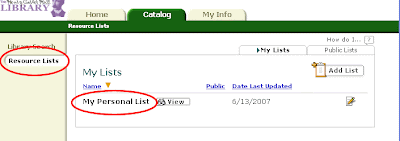
When you're logged into the catalog, go to the "Resource Lists" area by clicking the link in the left-hand navigation. (Click here to see other posts in the blog about resource lists.) There you will see a summary of your lists. By default you should already have a list called "My Personal List."
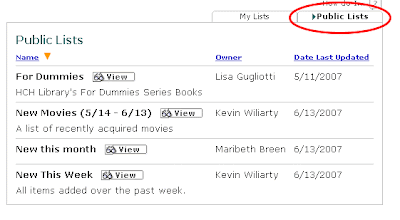
Notice that there are two tabs on the right at the top of the summary—one for "My Lists" and one for "Public Lists." Clicking on the "Public Lists" tab will take you to a summary of lists that users of our catalog have decided to share with everyone. There are a couple of lists already there that staffers have built, but now we've opened it up so that all registered patrons can publicize lists.
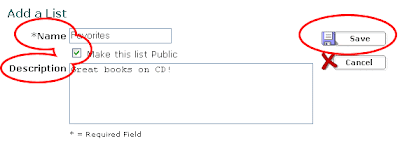
Here's how to create a public list.
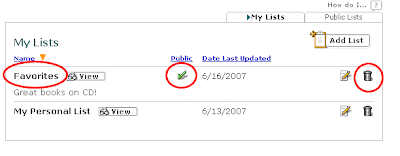
Your list will now show up in the summary of "My Lists." The green check-mark will indicate to you that the list is public. For other users of the catalog, but not for you, your list will show up under "Public Lists." Please note that you will be identified by your full name as the owner of the list. You can delete a list at any time by clicking on the trash can.
You can now browse the catalog to add books to your list. Here's how:
We're looking forward to seeing what people like!
When you're logged into the catalog, go to the "Resource Lists" area by clicking the link in the left-hand navigation. (Click here to see other posts in the blog about resource lists.) There you will see a summary of your lists. By default you should already have a list called "My Personal List."

Notice that there are two tabs on the right at the top of the summary—one for "My Lists" and one for "Public Lists." Clicking on the "Public Lists" tab will take you to a summary of lists that users of our catalog have decided to share with everyone. There are a couple of lists already there that staffers have built, but now we've opened it up so that all registered patrons can publicize lists.

Here's how to create a public list.
- Click on the "Add List" button in the upper right-hand corner of the "My Lists" summary box.

- Create a name for the list. "Favorites" for example.
- Check the box to make the list public.
- Optionally, you can provide a description of the list, like: "Great movies for kids" or "Mysteries I loved."
- Click save.


Your list will now show up in the summary of "My Lists." The green check-mark will indicate to you that the list is public. For other users of the catalog, but not for you, your list will show up under "Public Lists." Please note that you will be identified by your full name as the owner of the list. You can delete a list at any time by clicking on the trash can.

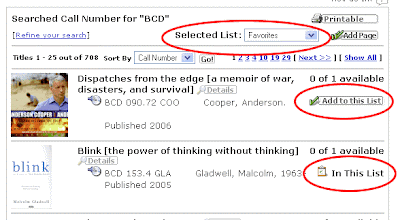
You can now browse the catalog to add books to your list. Here's how:
- On any page that lists items from our catalog you will find a drop-down box labeled "Selected List."
- Choose the list you want to add to from the drop-down list.
- Then click on the "Add to this List" button for the appropriate item. (If the item is already in the list, the button will read: "In This List.")

We're looking forward to seeing what people like!
Wednesday, June 13, 2007
New This Week
Hot on the heels of the new movies list, we have decided to add another public list that will show all new titles added over the past week. See the previous post for instructions about how to find all the public lists in our catalog, or just click here to go straight to "New This Week".
Subscribe to:
Posts (Atom)